One of the best quality-of-life features in VMware Cloud Foundation is that SDDC Manager handles credential lifecycle management across your core stack. Instead of tracking spreadsheets or manually cycling passwords on vCenter, SSO, and NSX, you can put them on an automated rotation schedule.
How Scheduled Rotation Works
When an auto-rotation policy is triggered, SDDC Manager generates a randomized, policy-compliant password, updates the credential directly on the target component, syncs any dependent integrations, and stores the new credential in its encrypted database.
- In the SDDC Manager UI: Under Security > Password Management, you can enable scheduled rotation with standard intervals of 30, 60, or 90 days.
- Via the SDDC Manager API: Using
PATCH /v1/credentialswith theUPDATE_AUTO_ROTATE_POLICYoperation, you aren’t restricted to the UI presets you can define custom intervals (frequencyInDays) to match strict internal compliance policies.
Which Credentials Support Scheduled Rotation?
Not every account in VCF can be placed on an automated rotation schedule. Below is the breakdown of which core component credentials support scheduled rotation and which ones require manual or on-demand rotation.
| VCF Component | Account / Credential | Scheduled Rotation Supported? | Notes |
| vCenter Server | root | Yes | Configurable via UI (30/60/90 days) or custom interval via API |
| Single Sign-On | administrator@vsphere.local | Yes | Configurable via UI (30/60/90 days) or custom interval via API |
| NSX Local Manager | root, admin, audit | Yes | Configurable via UI (30/60/90 days) or custom interval via API |
| NSX Global Manager | root, admin, audit | No | SDDC Manager is not aware of NSX Global Managers |
| NSX Edge Nodes | root, admin, audit | Yes | Configurable via UI (30/60/90 days) or custom interval via API |
| NSX Virtual Network Appliance | root, admin, audit | Yes | Configurable via UI (30/60/90 days) or custom interval via API |
| SDDC Manager | backup | Yes | Configurable via UI (30/60/90 days) or custom interval via API |
| SDDC Manager | vcf, root | No | In VCF 9.1.0, manually update password in the OS In VCF 9.1.1, passwords can be updated from VCF Operations UI or API |
| SDDC Manager | admin@local | No | In VCF 9.1.0, manually update password in SDDC Manager API In VCF 9.1.1, password can be updated from VCF Operations UI or API |
| ESX Hosts | root, svc-vcf-* | No (On-demand only) | Scheduled rotation is unsupported by design. Rotate on-demand via UI, or API |
| Service Accounts | svc-* (vCenter, NSX etc) | Yes (Automatic) | System-managed accounts (e.g., svc-sfo-vcf01-*) default to a 30-day auto-rotation policy out of the box |
For more details on Service Accounts, see Accounts in VMware Cloud Foundation
Quick Tip: Audit Your Active Policies via API
If you want to quickly verify which credentials in your environment currently have an active rotation schedule, and when they are due to rotate next, you can query the SDDC Manager API
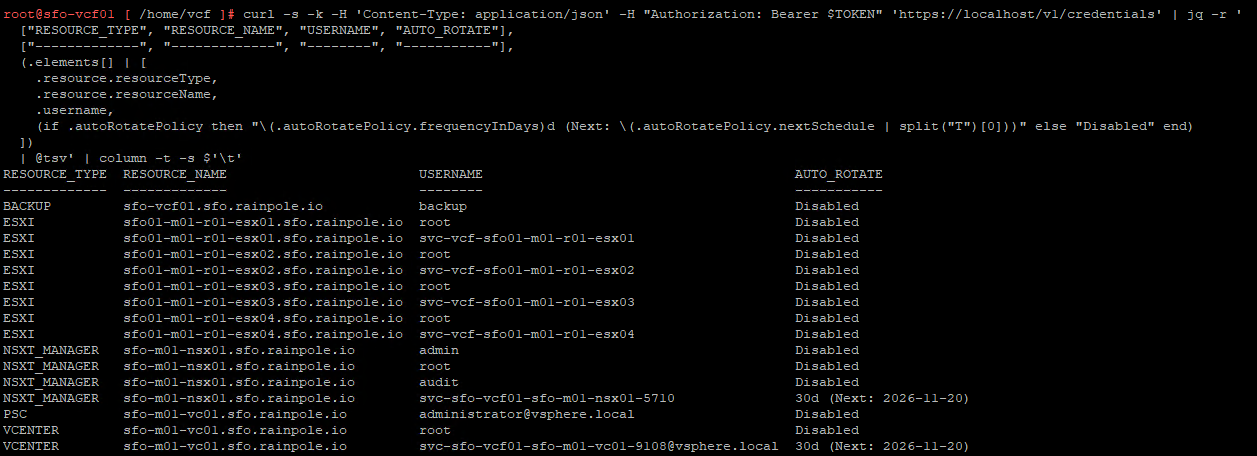
This is the command I used
curl -s -k -H 'Content-Type: application/json' \
  -H "Authorization: Bearer $TOKEN" \
  'https://localhost/v1/credentials' \
| jq -r '
  ["RESOURCE_TYPE", "RESOURCE_NAME", "USERNAME", "AUTO_ROTATE"],
  ["-------------", "-------------", "--------", "-----------"],
  (.elements[] | [
    .resource.resourceType,
    .resource.resourceName,
    .username,
    (if .autoRotatePolicy then "\(.autoRotatePolicy.frequencyInDays)d (Next: \(.autoRotatePolicy.nextSchedule | split("T")[0]))" else "Disabled" end)
  ])
  | @tsv' \
| column -t -s $'\t'
Quick Tip: Setting a custom rotation schedule via API
If the predefined 30, 60, 90 days does not meet the requirements you can set a custom schedule.
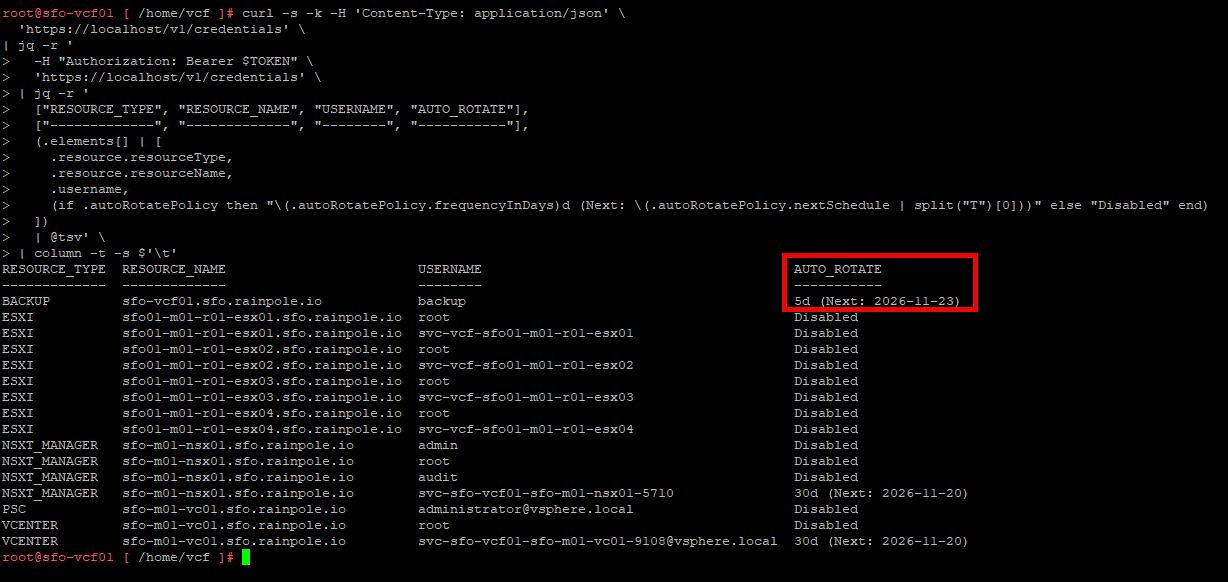
In this example, I’m updating the BACKUP user on SDDC Manager to set a scheduled rotation every 5 days.
curl -k -X PATCH 'https://localhost/v1/credentials' \
  -H 'Content-Type: application/json' \
  -H "Authorization: Bearer $TOKEN" \
  -d '{
    "operationType": "UPDATE_AUTO_ROTATE_POLICY",
    "autoRotatePolicy": {
      "enableAutoRotatePolicy": true,
      "frequencyInDays": 5
    },
    "elements": [
      {
        "resourceId": "df28666b-1ac8-492b-a3b0-d372379b92b5",
        "resourceName": "sfo-vcf01.sfo.rainpole.io",
        "resourceType": "BACKUP",
        "credentials": [
          {
            "accountType": "SYSTEM",
            "credentialType": "FTP",
            "username": "backup"
          }
        ]
      }
    ]
  }'
Afterwards, we can verify that the credential has an updated schedule

Leave a Reply